Step 1... Login
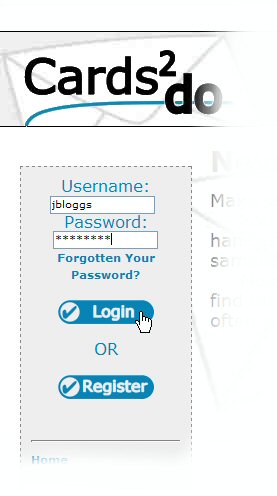
From the Cards2do.co.uk homepage...
- Enter your username
- Enter your password
- Click Login
Step 2... Add Cards
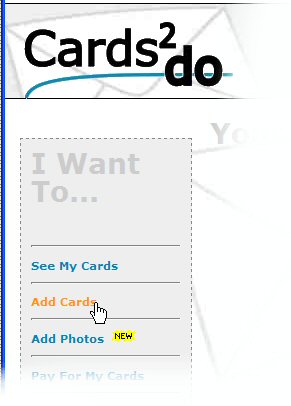
You will now be in your personal account page.
- Select "Add Cards" from the left-hand menu.
- Select the category you want
- Then choose the perfect card for your recipient!
Step 3... Enter Details
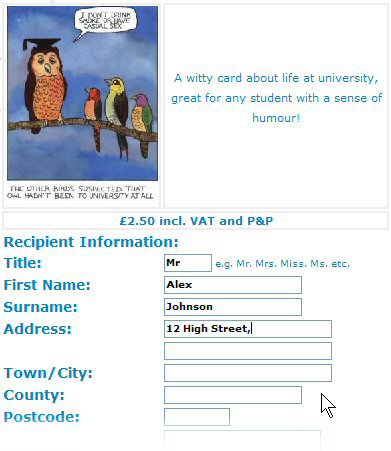 Once you click on the card you want, you will see this screen...
- Carefully enter all your recipient's details.
- Click on the small calendar image to select a date.
- At this point you can even add a gift voucher! Up to £50 from your high-street favourites!
- Click "Next" to add the card to your account.
Step 5... Pay for your cards.
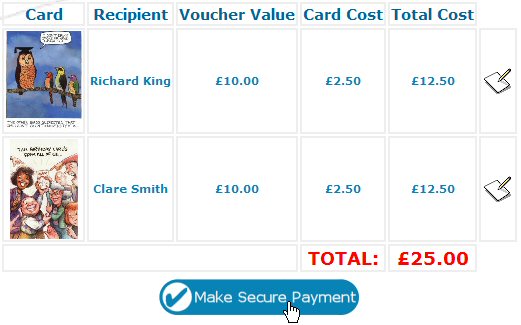
- Click on "Pay For My Cards" on the left-hand menu in your account.
- You will now see the checkout screen.
- Click "Make Secure Payment" to be redirected to PayPal, the trusted online card processor.
The End...
Where next?- Back to the Cards2do Homepage
- Why not check out our Photo Album Tutorial?
- Have a Comment? E-mail us at contactus@cards2do.co.uk
Thanks for reading this tutorial...